
Digital Elevation Models (DEMs)
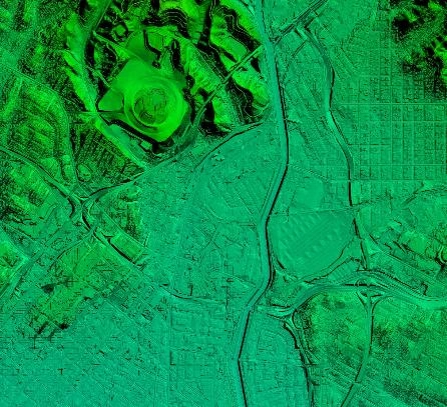
DTM
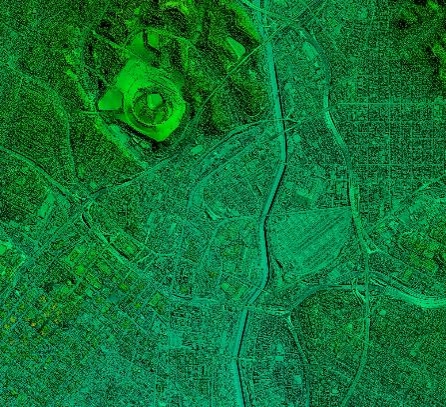
DSM
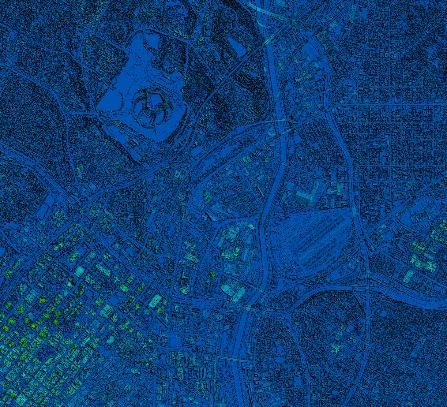
nDSM/CHM
LAND INFO’s high quality Digital Elevation Models (DEMs) will aid you in achieving your project goals in the most efficient manner. We may already have the data you need in our archive, or can custom produce it upon request to your specifications.
Our Project Managers will work closely with you and your staff, taking into account the area in question, your project needs and budget to propose the most effective Digital Elevation Model solution.
Contact LAND INFO for a project recommendation.
Digital Elevation Models (DEMs) can be derived from a number of sources:
Topographic maps — large-area cost-effective coverage
High-res optical stereo (true in-line stereo and pseudo-stereo) satellite imagery such as GeoEye-1, WorldView-1, WorldView-2, WorldView-3, WorldView-4, Pléiades Neo, Pléiades 1A, Pléiades 1B & IKONOS — accurate and detailed terrain data of site-specific locations on a global basis.
Medium-resolution optical stereo pairs including SPOT-6, ALOS & ASTER — large-area cost-effective coverage.
USGS 3DEP – Land Info’s cloud-based processing rapidly and cost-effectively coverts OTS (Off-the-Shelf) LiDAR point clouds to value-added gridded raster formats (32-bit GeoTiff and .img); our processing will also remove common errors/anomalies from LiDAR data. Contact us for a free search of OTS LiDAR (USA only).
Radar satellite imagery including RadarSat-2, TerraSAR-X and TandemSAR-X — 10m DEMs of tropical areas that would be too cloudy for optical satellite solutions.
Crewed aircraft — LiDAR, stereo imagery and PhoDAR/SGM (Semi-Global Matching DSMs) are available off-the-shelf for most of the USA, custom missions upon request. Outside of USA possibility to use a portable sensor that can be installed on a locally available non-modified aircraft.
UAS (Uncrewed Aircraft System, commonly referred to as a drone) — a new alternative for areas where crewed aircraft are either not available or would be prohibitively expensive, and satellite solutions don’t meet project specs. LAND INFO’s UAS offers up to 1.5cm resolution imagery/5cm resolution DEMs, achieving 15cm vertical accuracy without GCPs!
Off-the-shelf global DEMs: Airbus WorldDEM 12m, Airbus WorldDEM Neo 5m, Vivid Terrain (formerly Maxar Precision 3D/Vricon), NTT AW3D Enhanced (50 cm – 2m) and Standard (2.5m & 5m), Copernicus GLO-30 DEM, AW3D30, NASADEM/SRTM 30m, GDEM 30m.
Off-the-shelf airborne DEMs — select coverage of USA, Canada, Europe, Australia & New Zealand: 3DEP LiDAR (USA only), Hexagon 15 cm – 40 cm USA & Western Europe, Vexcel USA & Western Europe, Nearmap 15 cm USA, Australia & New Zealand metro areas, Intermap 5m NextMap (full coverage of conterminous USA and Western Europe, select additional global coverage), Contact us for new lower pricing & min orders.
DEMs are available in three main types: Digital Terrain Models (DTMs) represent bare-earth ground (hypothetical ground where vegetation and structures have been removed.) Digital Surface Models (DSMs) are first-level surface, meaning what they model includes absolute elevations of the top of structures and vegetation. nDSMs, also known as Canopy Height Models (CHMs) subtract the DTM from the DSM to model the relative height of trees, buildings and other above-ground objects. Additional ways to represent 3D surfaces of the earth include point clouds (typically .las or .laz), photo-realistic textured 3D Surface Models (COLLADA, ESRI I3S & OGC Standard 3D tiles) and vector formats: contours, Z-attributed 3D building/tree models, Triangular Irregular Networks (TINs) and rectangular grids.
Common Uses and Advantages of Digital Elevation Models (DEMs)
What are some common uses for DEMs?
- Watershed Modeling
- Civil Engineering
- RF Modeling (Wireless Communications)
- Simulation & Training – Military, Aviation, Urban Planning
- Cartography/Base Mapping
- Mining
- Orthorectification Advantages of using LAND INFO DEMs:
- Accuracy and Quality
- Extensive Geographic Coverage
- Quick Turn-around Times
- Multiple solutions available to meet your project and budget needs
- Custom recommendation for your specific project area/type
Related Pages: